![Andy Freund [Head of Growth & Customer Management]](https://simplesystem.com/hs-fs/hubfs/Autoren_Blog/Andy_Freund_autor.png?width=200&name=Andy_Freund_autor.png)
30.10.2026

![Andy Freund [Head of Growth & Customer Management]](https://simplesystem.com/hs-fs/hubfs/Autoren_Blog/Andy_Freund_autor.png?width=100&name=Andy_Freund_autor.png)

“We don’t have anyone who can handle this”—this statement halts the digitization of procurement in many companies before it even begins. The concern is valid, but it’s focused on the wrong risk: It’s not the software that requires IT resources, but the project surrounding it. And that’s exactly what can be avoided. This article specifies exactly what effort is involved, what remains an internal task, and what you can manage on your own afterward.
A procurement platform based on the SaaS model can be implemented without an in-house IT department: no server, no installation, no interface development. The system goes live in about 30 days. To get started, web-based access is all that’s needed; the ERP integration is optional and can be added later as an add-on.
Key points at a glance:
Those without an IT department put off digitization—and end up paying the highest price for it. The figures from HTWK Leipzig clearly show this: Small businesses spend 54 minutes per order. Medium-sized businesses manage with 30 minutes, and large ones with 38.
The reason isn’t a lack of ability, but a lack of tools. According to the study, 54.7% of small businesses use non-task-specific tools like Excel for demand management, and only 11.3% have digitally integrated processes. The proportion of integrated processes is higher among medium-sized businesses and even higher among large ones.
Key Fact: According to HTWK Leipzig, small businesses spend 54 minutes per order— whilemedium-sized businesses spend only 30 minutes. The time spent per order is highest where the capacity for digitization is lowest.
A second finding is noteworthy: Small businesses use electronic marketplaces 70% more frequently than large businesses, which use them 60% of the time. So the willingness is there—what’s missing is a way to make it work without a project.
The concern about IT projects stems from a time when software had to be installed. With a cloud platform, the distribution of tasks shifts fundamentally:
|
Task |
Traditional software project |
Procurement platform in the SaaS model |
|---|---|---|
|
Servers and infrastructure |
Own hardware or hosting required |
Not applicable |
|
Installation and Updates |
Performed by IT or a service provider |
Performed by the provider; included in the service |
|
User management |
via IT ticket |
Directly in the interface |
|
Catalogs and product range |
Data import by IT |
Business decision by Purchasing |
|
Approval rules |
Customizing |
Configuration in the User Interface |
|
ERP integration |
Custom interface development |
Optional add-on via standard interfaces |
|
Data Backup |
To be organized internally |
by the provider |
What remains are not IT tasks, but decisions: Who is authorized to order what?? Up to what amount without approval? Which suppliers are allowed on the platform? No one other than the procurement department itself can or should answer these questions.
The most common mistake made by organizations without an IT department is to bundle Stage 1 and Stage 2 into a single project—and then fail at the ERP integration before a single order has even been placed.
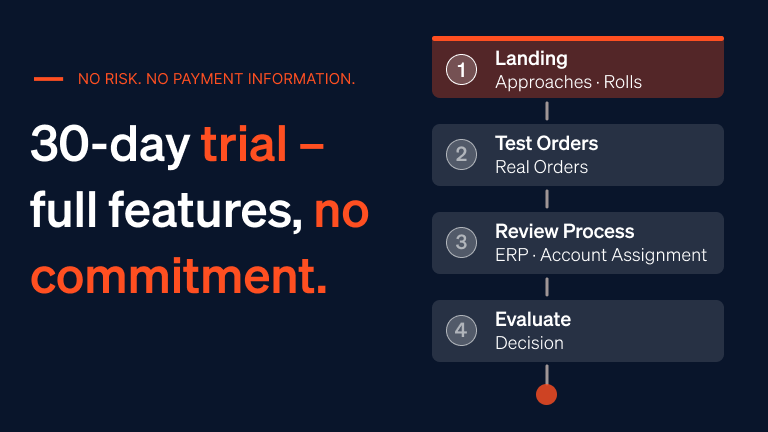
Stage 1—Web usage without IT involvement. Create user accounts, set roles and approval limits, customize the catalog, place orders. No server, no interface, no IT involvement. This stage alone delivers the majority of the process cost savings because it eliminates the manual ordering process. A free trial period allows you to get started here with no contractual commitment.
Stage 2 – ERP integration as an add-on. Only once Stage 1 is running smoothly in day-to-day operations is it worthwhile to integrate with the merchandise management or ERP system. With simple system, this can be purchased as an add-on, with one-time integration costs starting at €2,500. Crucial for businesses without their own development capacity: Data exchange works not only via REST API but also via SFTP or email. Account assignment objects such as cost centers, general ledger accounts, and project codes are transferred directly into the ERP system.
Tip: Deliberately space out these two steps. If you place your order first and then set up the integration, you’ll see tangible benefits within a few weeks—and have a much stronger basis for justifying the ERP integration internally.
Key Fact: A procurement platform based on the SaaS model can go live in about 30 days—without servers, without installation, and without an in-house IT project. Basic functionality is available much sooner because it doesn’t require an interface.
No provider can take over these four points because they pertain to your organization. The effort involved is manageable—but it’s real, and those who plan for it won’t be caught off guard.
|
Task |
Who in the company |
One-time effort |
Ongoing effort |
|---|---|---|---|
|
Define catalog scope and product categories |
Purchasing |
a few hours |
Occasional adjustments |
|
Define users, roles, and approval limits |
Purchasing with management |
a few hours |
When there is a personnel change |
|
Set up cost centers and account assignments |
Accounting |
A few hours |
Rarely |
|
Designate a contact person for the platform |
Management |
Decision |
A few hours per month |
One point deserves emphasis: The point of contact does not need to have any IT knowledge. What’s needed is someone who is familiar with the organization’s procurement processes—typically from the purchasing department or commercial management.
In practice, “self-management” means that the most common changes can be made without external help:
The training required for purchasers is minimal because the interface follows the logic of an online store. This offers a double advantage for businesses without an IT department: There’s no one who needs to organize training—and there’s no need for it either.
No risk, no commitment, no payment details. Experience the entire platform, from the first shopping cart to automated invoicing. Discover at your own pace how simple digital purchasing can really be.
These eight questions distinguish providers who “simply” make claims from those for whom the claims actually hold true. Make sure you get concrete answers— “of course” is not an answer.
Question 6 is the crucial one. A provider who doesn’t give a specific figure for this has either not assessed the effort involved—or it’s higher than you’d like.
Companies without their own IT department can implement and operate e-procurement on their own—provided they don’t try to cram everything into a single project. The process involves two stages: first, pure web-based use, which works without IT involvement and delivers the bulk of the savings; then, optionally, the ERP integration. What remains in-house are four business-specific tasks—and those belong in the procurement department anyway.
Yes. In the SaaS model, servers, installation, updates and data backup are no longer needed internally, as these tasks lie with the provider. What remains in-house are business decisions on the catalog, user roles, approval limits and cost centers. No IT expertise is required for this.
Go-live is reached in around 30 days. Since no installation or interface development is needed, basic use is available much earlier; a later ERP connection is planned as a separate stage and does not delay the start.
No. You can start without an ERP connection and still achieve most of the process cost savings, because the manual ordering process is eliminated. The connection can be added later as an add-on once operations are running smoothly.
With simple system, the ERP connection is an add-on with one-time integration costs starting at €2,500. Data can be exchanged via REST API, SFTP or email; the email and SFTP options require no in-house development capacity.
A designated contact person from purchasing or commercial management, without an IT background. Typical tasks include creating users, adjusting approval limits and analyzing spend, which realistically takes a few hours per month.
Very little, as long as the interface follows the logic of an online shop. Requesters usually find their way around without formal training; the main effort lies with the person who configures roles and rules.