No Major SAP project. No programming effort. No months-long rollout.
Over 200 customers are already using it productively.
Our SAP experts know the pitfalls from 25 years of practical experience and have already solved them for you.
200+ customers rely on our SAP integration

The simple system SAP-Cockpit® seamlessly connects your purchasing process with SAP
The smart SAP integration for your purchasing.
Completely digitize processes
Automate the entire purchasing process: from the purchase requisition to invoice verification.
Keeping data clean and up to date
Receive all information provided with the order automatically in your SAP.
Analyze order behavior
Strengthen your SAP as the leading system for holistic order analysis.
SAP-Cockpit® Savings calculator
How many orders do you place per month?
Manual order processes without simple system SAP-Cockpit®
How do we calculate the monthly savings potential?
The amortization results from the monthly costs for the base package (€99), marketplace (€99), controlling (€99), and the ERP package (€99). Additionally, there are one-time integration costs of 4.000€ for the SAP-Cockpit. The time savings are based on the study "Managing Indirect Procurement: Success Factors for Performance and Cost Control" by the University of Applied Sciences Leipzig (2025). The hourly rate is calculated at €40.
No more complicated shopping.
How do I integrate simple system into my SAP?
Many SAP customers do not know how to seamlessly integrate simple system into their existing SAP systems.
Concerns often arise with questions such as:
- What are the technical requirements?
- How long does the integration take?
- What data will be transferred?
- Are we safe from data loss?
Complete purchase-to-pay automation
The purchase-to-pay (P2P) process is often completely manual: employees create purchase orders in Excel or email, invoices are scanned by post/email, OCR errors require manual correction, 3-way matching is carried out manually, approvals are made via distributed approval processes.
A typical P2P process takes 3-5 working days from invoice to payment. Invoice processors are constantly busy with repetitive tasks.
There is another way.
SAP Manual vs. with simple system SAP-Cockpit®
-
Data transmission & maintenanceData transmission & maintenancewithout simple systemManual updating of order data in SAP costs valuable timewith simple system
Automated creation of SAP purchase orders (PurchaseOrder)
-
Data quality & standardsData quality & standardswithout simple systemError-prone due to copy-paste and lack of standardswith simple systemMapping of G/L accounts with S2Class (eCl@ss) categories, standardized and reliable
-
Approval processesApproval processeswithout simple systemApprovals bypass SAP - or are maintained twicewith simple systemComplete approval logic can be controlled via simple system
-
G/L accounts & cost centersG/L accounts & cost centerswithout simple system
No automatic assignment of G/L accounts or cost centers
with simple systemCost center types: K, F, P, A - automatically assigned (others on request)
-
Purchasing & ControllingPurchasing & Controllingwithout simple system
Media disruptions prevent transparent purchasing processes - controlling suffers
with simple systemCentral dashboard for full transparency of order status
-
Connection & developmentConnection & developmentwithout simple system
IT has to develop individual SAP connections - expensive and complex
with simple systemConnection of external users - even without SAP knowledge (e.g. facility, workshop)
-
Classification & RoutingClassification & Routingwithout simple systemNo automatic recognition of product groups and purchasing groupswith simple system
Automatic recognition of product groups and purchasing groups
-
Compliance & ReportingCompliance & Reportingwithout simple system
INTRASTAT declarations must be created and transmitted manually
with simple systemSupport of INTRASTAT messages - directly integrated
Three options for integration
Shopping and ordering - the simple system Cockpit® helps in 3 ways.
Shopping and placing orders in simple system
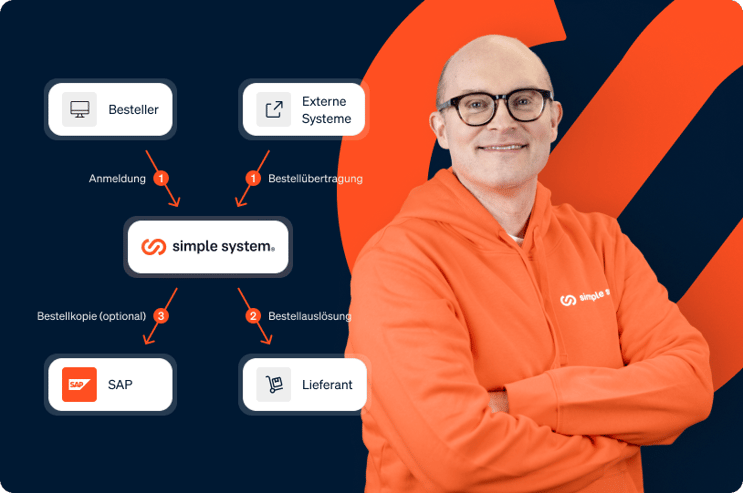
Orders are placed in simple system, approved and transferred to the supplier. They are created in SAP in parallel. The cockpit is more than just an interface: you can configure how and with which parameters orders placed in SAP are enriched and created.
Your process | your configuration | your parameters
Purchasing in simple system - placing orders in SAP
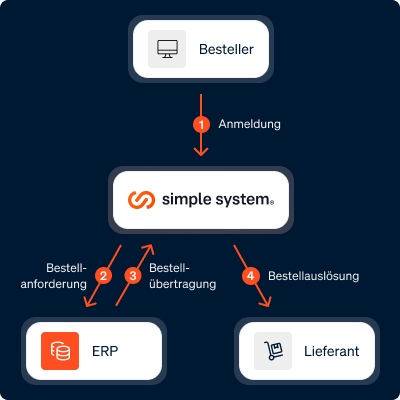
The customer accesses the supplier's catalogs and price lists directly via simple system. If he sends the shopping cart, a purchase requisition is created in SAP, where approval also takes place. The order is then transferred to the supplier via simple system.
Your suppliers | your catalog | your approval process
Start in SAP, purchase in simple system, trigger order in SAP
Store vendor numbers for suppliers and define supplier-specific vendor numbers. This eliminates the annoying assignment of invoices to vendors from your SAP/SRM.
Simple | Secure | Structured
The integration into our SAP ERP® went smoothly. We were immediately impressed by the clear mapping of the procurement process in the simple system cockpit. Our approvers check individual processes there and then release the orders.
All functions in the SAP package at a glance
-
simple system's SAP integration connects your procurement platform directly with your enterprise resource planning system. Orders, goods receipts, invoices and master data are automatically synchronized - without manual double entry. Data is exchanged in real time or as a batch process via standardized interfaces (REST API, IDOC, BAPI). Account assignment objects such as cost centers, G/L accounts and project codes are transferred directly from SAP so that every order is immediately posted correctly. The integration supports multi-client scenarios and can be flexibly adapted to individual data structures.
-
- Bidirectional real-time synchronization of order and master data
- Automatic comparison of goods receipts and invoices (3-way match)
- Transfer of all account assignment objects (cost centers, G/L accounts, projects, WBS elements)
- Support for SAP (MM/FI), Microsoft Dynamics 365, Oracle and other ERP systems
- Flexible interface configuration (REST API, IDOC, BAPI, CSV)
- Multi-client capability for group structures
- Error monitoring and automatic repeat logic in the event of transmission problems
-
- Elimination of manual data transfer: Savings of 15-25 minutes per order
- Reduction of booking errors by up to 95% through automated account assignment
- Acceleration of the purchase-to-pay cycle by 60-70%
- Real-time visibility of all procurement spend in ERP
- Amortization typically within 3-6 months
- At 500 orders/month: savings of ~170 working hours/month
-
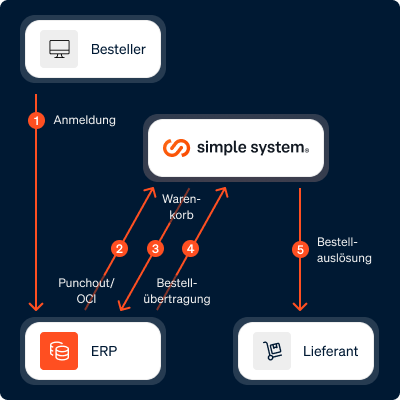
The OCI interface (Open Catalog Interface) enables your employees to access the simple system catalog directly from the SAP system or another ERP. Users switch seamlessly to the simple system interface using the punchout method, search for and configure products and automatically transfer the shopping cart back to the ERP. All account assignment information is retained and approval processes work as usual. This significantly lowers the barrier to catalog use, as employees can remain in their familiar system environment. The OCI integration supports both OCI 4.0 and OCI 5.0 and is compatible with SAP SRM, SAP Ariba, Coupa and other procurement suites.
-
- Punchout catalog access directly from SAP, Ariba, Coupa and other systems
- Automatic shopping cart transfer with all item details and account assignments
- Support for OCI 4.0 and OCI 5.0 standards
- Single sign-on (SSO) for seamless system changes
- Retention of all ERP-side approval processes
- Roundtrip-capable: Order status and delivery information flow back
-
- Increase in catalog usage rate by 30-50% due to low entry hurdle
- Avoidance of maverick buying through a guided ordering process
- Reduction of process costs per order by 40-60%
- No training required - users remain in their familiar SAP environment
- Compliance rate increases to >90% thanks to system-supported processes
- Average savings of €8-12 per order process
-
The external search endpoint expands simple system's product search to include external data sources. Supplier catalogs, internal material databases or specialized industry catalogs can be integrated into the search results via a standardized API. Your employees search once and receive results from all connected sources - clearly summarized in a uniform display.
The relevance sorting takes all sources into account equally so that the best offer is always found. Filters and facets work across all sources, and orders are automatically routed to the right source.
-
- API-based integration of external product catalogs
- Standardized search result display from all sources
- Cross-source filters and facets
- Automatic routing of orders to the right source
- Real-time availability and price query for external sources
- Configurable prioritization and weighting of search results
-
- Increase article coverage by 200-500% without manual catalog maintenance
- Reduction of off-contract orders by up to 70%
- Time savings of 20-30 minutes per search process for special items
- Automatic price comparison across all connected sources
- Avoidance of duplicate procurement through central visibility
- Better conditions due to increased bundling effects
from 99 € / month for the use of the "SAP" add-on
Your purchasing digitized. Book a demo now and get started!
Experience the possibilities of our platform in a personal demo and see how easy digital shopping can be.
Change needs strong partners: We accompany you personally during your SAP integration
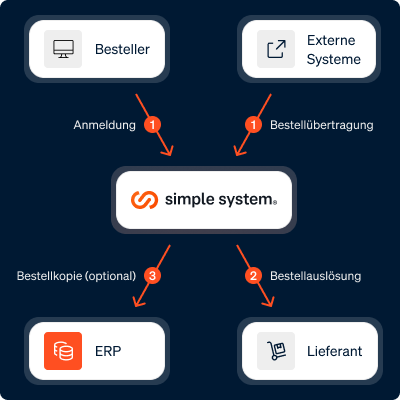
I bring customers and suppliers together - and ensure that SAP integrations run smoothly and stably.
The more complicated the issue, the better. I delve deep into complex processes and find the right way forward.

Walter Ahmann
Walter Ahmann shows you how a simple system can work for you.
You don't have SAP? No problem.
Seamlessly connect your ERP system with simple system and benefit from automated procurement processes, real-time data synchronization and maximum efficiency. Click here for the ERP package >>
Questions about the simple system Cockpit®
-
A large number of ERP/SRM systems are supported, including SAP ERP, SAP S/4 Hana, SAP SRM, sage 100cloud, sage b7, sage Business Cloud, infor CloudSuite, ProAlpha, ABAS, Microsoft Dynamics 365, Microsoft Dynamics AX, PSI. Contact us with your ERP system and we will let you know which connection options to simple system are possible.
-
Flexible integration into existing company processes and conscious expansion of existing strengths
-
Dashboard for transferring, approving and tracking procurement processes
-
Fully automated purchase requisition and order creation according to company specifications
-
Cross-supplier order integration via an interface
-
Based on existing internal guidelines
-
Further processes such as integration of accounting, goods receipt and invoice reconciliation / credit note creation in the leading merchandise management system
Transparency and user-friendly interface with low training requirements
-
Highuser acceptance through the use of a modern web application
-
Users do not require any training in the merchandise management system
-
Reporting / evaluations of all orders in the merchandise management system or in simple system possible
Fast implementation with minimal strain on the internal IT department
-
Turnkey solution for the integration of SAP ERP® and SAP S/4HANA®
-
Numerous successful projects with SAP SRM®, abas ERP, Infor CloudSuite™, Microsoft Dynamics NAV and AX, proALPHA ERP, PSIpenta ERP, various Sage ERP and other leading merchandise management systems
-
-
With the Cockpit Order variant, the customer logs in to simple system and places the items in the shopping cart. Sending the shopping cart triggers the order with the supplier and the order is created in the ERP system via the EDI interface at the same time. In this way, the entire process is automatically recorded directly in the ERP system and all data relating to the order is transferred to the ERP system. Any approval processes can be configured in simple system and releases are usually made via automatically generated e-mails. There is no need to log in to the platform. The company benefits from a reduced workload and retains data sovereignty over all order processes. With the cockpit workflow variant, the customer accesses the supplier's catalog via simple system and creates a shopping cart. However, if they send the shopping cart, the order is not triggered at the supplier - as with Cockpit Order - but only a purchase requisition is initially created in the ERP. For the approval process, the steps of the approval process applicable in the company are run through in the ERP. Only once this has been completed is the order transferred to the supplier via the e-procurement system and thus triggered. All these steps are automated - the workload is correspondingly low.
-
This depends on the type of connection. If approval processes, order number assignment and the triggering of the order are still to take place in the ERP, then the connection options OCI Punchout and Cockpit Workflow are suitable. If these functions are to be handled in simple system in the future, then Cockpit Order is the right integration for you.
-
Which connection is right for you depends largely on your purchasing strategy and your system landscape. The table above can serve as a guide. If you want to start the ordering process in your ERP environment, then only OCO-Punchout is suitable. If customers are to be able to order directly in simple system, then Cockpit Order or Cockpit Workflow are suitable. If approval processes and order number assignment are still to take place in the ERP, Cockpit Workflow is the right choice for you. If approval processes and order number assignment are to take place in simple system, Cockpit Order appears to be a good option.
-
The integration of your ERP/SAP system costs €99 per month and account when booked annually. Depending on the integration variant, there is also a one-off cost of €2,500 for an ERP interface and €4,000 for an SAP cockpit.